
How to Spot Smishing and Phishing Texts — Prevent the Damage of a Single Tap
The damage begins the moment you thoughtlessly tap a link in a single text message. Smishing (SMS + phishing) is a technique that sends malicious links or fake notices by text message to steal personal information or plant malicious apps. Texts these days have become so sophisticated they're hard to tell apart from real institutional notices, but knowing a few signs lets you filter out most of them. This article organizes the signs of the frequently used techniques, the step-by-step response to take if you've already tapped a link, and the everyday habits that reduce the damage. The goal is to put judgment criteria in your hands rather than to stoke fear.
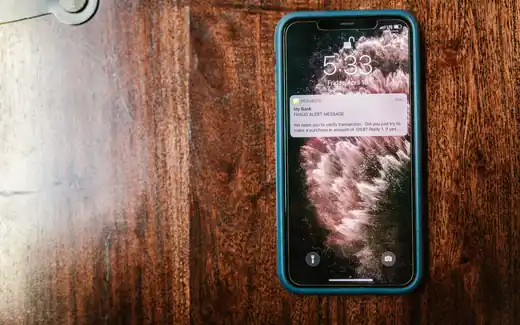
Be Suspicious of Texts Like These
Smishing exploits situations people reflexively check. Typical subject matter includes the following.
- Impersonating a delivery: Demanding you reconfirm, as in "[Delivery] Shipment held due to unclear address, please confirm your details." It's a delivery you never ordered, and legitimate couriers don't put personal-info entry links in texts.
- Impersonating a wedding invitation or funeral notice: Attaching a link with "We're getting married" or "We announce a passing." If there's no name you recognize and only a link, it's likely bait aiming to get you to install an app.
- Impersonating fines or penalties: Provoking anxiety with "Check your traffic violation fine" or "Notice of unpaid charges." Real administrative notices don't push you to pay via a text link.
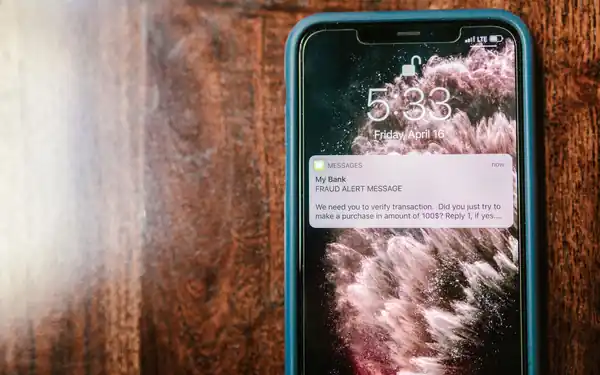
- Impersonating institutions: Disguising as health-checkup notices, subsidy payouts, or card-company approval texts to lure you into logging in.
Apart from the content, there are signs that show in the format. One by one, they are as follows.
- Overseas-sender label: If a supposedly domestic notice has an international-call symbol (+) or an unfamiliar country code in front of the sender number, or the sender is marked "international," be suspicious.
- Suspicious link addresses: It's dangerous if it's not the real institution's domain but a shortened URL like bit.ly, a meaningless jumble of letters and numbers, or an address that differs from the real domain by only a character or two (e.g., a look-alike spelling).
- Awkward sentences: Broken spacing or spelling, or sentences that urge you to act "right now, immediately" with excessive urgency, are classic bait.
- Demanding an app install: If tapping the link demands you install an app (APK) or a "security program," it's almost certainly malicious. Legitimate public or financial notices don't force app installs through text links.
The surest way to check is to confirm directly with the sender without tapping the link. For a delivery, use the official app from your order history; for a card company or institution, call not the number in the text but the main number on the official website or the back of your card, and cross-check the facts. Calling the help number written inside the text can connect you to the same crooked operation posing as the organization, so always verify through a separate channel.
Opening such links on public Wi-Fi also increases the risk. On weakly secured free Wi-Fi there's more room for your traffic to be exposed, so it's better not to open suspicious texts received while out and instead judge them calmly on cellular. As a rule, don't log in to frequently used accounts or make payments on public networks you can't trust.
Tapped It? Here's What to Do
If you've already tapped a link or installed an app, don't panic — take action in order.
- Cut off the internet connection: To block information leaks and remote control, immediately turn off Wi-Fi and mobile data, or switch to airplane mode.
- Delete the installed app: Check for recently installed unfamiliar apps and delete them. If deletion is blocked, boot into safe mode to remove it.
- Run a mobile antivirus scan: Run a full scan with an antivirus app to check for any remaining malware. The three carriers provide free smishing-blocking and antivirus apps.
- Check micropayments and payment history: Review carrier-bill micropayment history and card approval texts, and if needed, request a micropayment block from your carrier.
- Change your passwords: If you entered your ID and password into the screen the text lured you to, change that account and every other account that used the same password.
- Report it: File with the carrier customer center 118 (illegal spam / smishing reports), the police 112 or cybercrime reporting, and the Korea Internet & Security Agency (KISA) 118 counseling center. Don't delete the original text — keep it as evidence.
If financial loss has occurred, reporting to your bank's call center and the police (112) as quickly as possible to freeze the account's payments raises the chances of recovery. Response speed directly determines the scale of the damage. Afterward, keep an eye on payment texts and account-login alerts for several days to check for any secondary damage.
Everyday Habits That Reduce Damage
Smishing is hard to block completely, but you can set up defensive lines in advance so that even if you take the bait, the damage doesn't grow.
- Block installs from unknown sources: If you set your smartphone to block installing "apps from unknown sources" by default, malicious apps can't be casually installed even if you tap a link.
- Reduce or block micropayment limits: If you don't use them, block phone micropayments with your carrier in advance or lower the limit.
- Carrier spam-blocking services: Install the spam/smishing-blocking services and antivirus apps the three carriers provide.
- Different passwords per account: If you use the same password across many services, one breach cascades into all of them being stolen. Adding two-factor authentication lets you protect the account even if the password leaks.
- Keep your OS and apps up to date: Don't put off updates that patch security vulnerabilities.
Common Mistakes
Many people say "I only tapped it to check." A link can be dangerous the moment you open it, so your judgment has to be finished before you open it. And one more thing — unconditionally trusting a text just because it's from a number you know is also dangerous. When an acquaintance's phone is infected, smishing spreads under their name. You need the habit of confirming the facts directly by phone whenever a link looks off. Reusing the same password across many accounts, and leaving the setting that allows installs from unknown sources on, are also factors that magnify the damage.
Frequently Asked Questions (FAQ)
Is it safe if I only tapped the link and didn't enter anything?
Merely opening a page often causes no harm, but if the page pushed an app install or started an automatic download, you can't be at ease. It's safest to check whether an unfamiliar app was installed and to run a mobile antivirus scan once.
Where do I report a smishing text?
You can report and get counseling on illegal spam / smishing at the carrier and KISA number 118, and if there's financial loss, use the police 112 or the cybercrime reporting channel. Keep the original text as evidence.
The text came under a family member's name — why is it smishing?
When a family member's or acquaintance's device is infected with a malicious app, the same text can be mass-sent to the contacts stored on it. Even if the name matches, if it demands a link or app install, confirm by a direct call before responding.
All content is fact-checked under our editorial standards.